Game Help:TS3 EADM Issues
From SimsWiki
Revision as of 18:16, 13 April 2010 by EllaCharm3d (Talk | contribs)
| Sims 3 Game Help Categories: | |
|---|---|
|
Custom Content | Installation | Gameplay Guides | Technical & Graphics Issues | Miscellaneous Issues | |
| MTS Help Q&A Forums | |
If you encounter issues while downloading Store/Exchange items or when trying to patch or Launcher won't even start, then maybe the issues is not the Launcher but EADM. Try suggestions as listed below.
Uninstall & reinstall EADM
- What EADM version are you using?
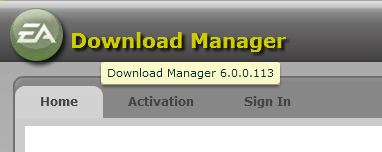
- To check for EADM version:
- http://thumbs2.modthesims2.com/img/1/5/1/5/0/0/2/MTS2_ellacharm3d_1059928_EADM_version.png
- hover over the EADM logo in upper left corner of the program window
- or if you have the icon on the system tray, right-click on this icon and then click on "About".
- Have you tried uninstalling, redownload and reinstall EADM? Seems that certain versions of the EADM are buggy.
- Allow Adobe Air to install and then update.
- If Adeobe Air had been installed previously with earlier versions of EADM, you will not be prompted to install it again.
- Reboot the system.
- After a reboot, EADM might prompt you for another update, let it complete as necessary.